
Back
5-Day Robux
How to view pending Robux on Roblox
How long does 5-Day Robux take to arrive in the account?
5-Day Robux not received even though the estimate has passed?
How to top up 5-Day Robux on Golrox
How to create a Gamepass and the price to set for 5-Day Robux
Gamepass still being requested, not requested, or error 404?
What does the 5-Day Robux order status mean?
Is 5-Day Robux guaranteed?
What is 5-Day Robux and why do I need to create a Gamepass?
How to make a Roblox place public and create a gamepass on mobile
How to Make Your Roblox Place Public and Create a Gamepass on Mobile
You can do it via mobile, no computer needed. Use a browser (Chrome or Safari), not the Roblox app.
Set your place to public
- Go to create.roblox.com/dashboard/creations and log in. If the display looks cut off, enable Desktop site in your browser.
- Tap on your place.
- In the left menu, go to Publication settings → Manage audience.
- Tap Manage access.
- Select Public, and make sure Friends is unchecked.
- Tap Save.

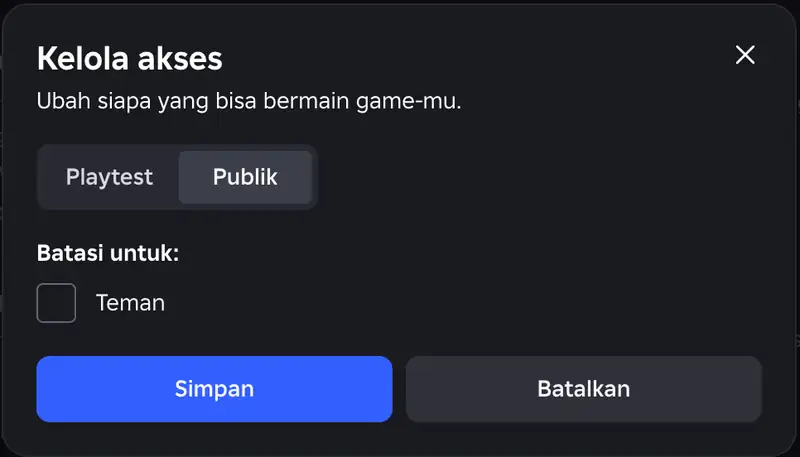
If it still doesn't work, fill out the questionnaire in Publication settings → Content ratings first.
Create a gamepass. The steps are the same in a mobile browser. Follow the guide on how to create a gamepass and the price you need to set. The gamepass is automatically detected by Golrox, so you don't need to send the gamepass link to the admin.
No Public option? This means your account doesn't meet the Roblox requirements to open games to other players. Check the requirements on the Roblox publishing permissions page. If you don't meet them, choose Instant Robux Username or Instant Robux Login which don't require a place or gamepass.
Was this helpful?

Need More Help?
Contact Our Customer Care
Ready to help from 06:00 - 24:00 every day!
© 2026 Golrox All Rights Reserved