
Back
5-Day Robux
How to view pending Robux on Roblox
How long does 5-Day Robux take to arrive in the account?
5-Day Robux not received even though the estimate has passed?
How to top up 5-Day Robux on Golrox
How to create a Gamepass and the price to set for 5-Day Robux
Gamepass still being requested, not requested, or error 404?
What does the 5-Day Robux order status mean?
Is 5-Day Robux guaranteed?
What is 5-Day Robux and why do I need to create a Gamepass?
How to Top Up 5-Day Robux on Golrox
These steps are for 5-Day Robux. Want your Robux instantly? Check out how to buy Instant Login Robux or Instant Username Robux.
- Go to the Buy Robux page and select the Five Days method.
- Choose the amount of Robux, or type in your own amount. Minimum is 10 Robux.
- Enter your Roblox username in the User Details section.
- Click Buy Now.
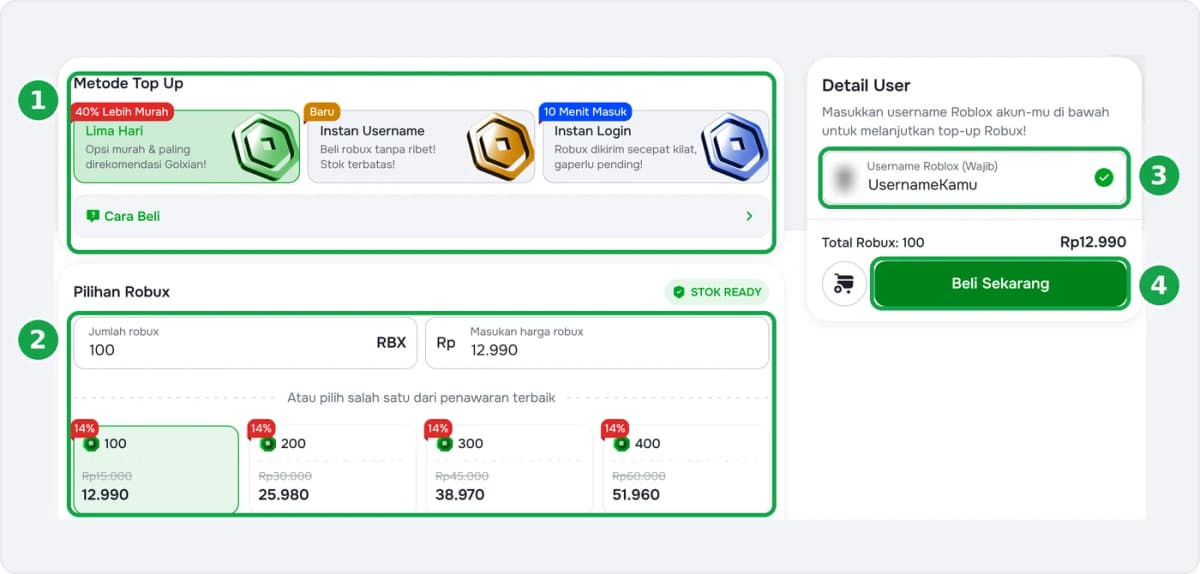
- Create a Gamepass with the specified price. Follow the guide on how to create a Gamepass and set the price.
- Choose your payment method and complete the payment.
Buying for a friend's account? You can. Just enter your friend's username, then have the Gamepass created on their account according to the instructions.
After paying, track your order on the Check Order page. You don't need to register an account to top up.
Was this helpful?

Need More Help?
Contact Our Customer Care
Ready to help from 06:00 - 24:00 every day!
© 2026 Golrox All Rights Reserved