How to Receive Robux via Roblox Username If It Hasn't Arrived
T
Tim Golrox
24 Nov 2026 • 03.22
How to receive Robux via username on Roblox, Accept button and parental permission
How you receive Robux via username depends on your account age. Age-verified accounts usually receive Robux automatically, while child accounts need to tap Accept and wait for parental approval.
If your order status is Delivered but your Robux balance hasn't increased, there's usually one step left to complete. This guide follows the sequence you see on your screen, from the transfer notification to when the Robux is ready to use.
Does Robux via Username Arrive Instantly?
Usually, Robux is sent about 5 to 10 minutes after a successful payment. The delivery uses Robux Transfer, a Roblox feature for sending Robux directly to other accounts.
There are three conditions that might prevent Robux from being used immediately:
- The transfer needs to be accepted or approved by a parent. This happens most often with child accounts.
- Your account's receiving limit is full. The remainder will be sent after the limit resets.
- Stock is on Pre-Order. Orders are sent according to the schedule shown at checkout.
How to Receive Robux on Accounts 18+
For accounts that are age-verified and have 2-Step Verification enabled, Robux usually arrives automatically. You don't need to do anything once the order status changes to Delivered.

Robux via username order status Delivered on the Golrox Order Check page
To be sure, check your Transaction History on Roblox. Received Robux will be recorded as Received Robux Transfer.

Robux arrival recorded as Received Robux Transfer in Roblox Transaction History
If a transfer message with an Accept button appears on your Robux page, tap that button so the Robux is added to your balance.
How to Receive Robux on Child Accounts
Accounts under 18 need to be linked to a parent account. In some countries, the limit is 16. This includes Roblox Kids and Roblox Select accounts for ages 5 to 15. Every Robux transfer to these accounts must be approved by a parent.
1. Link a parent account before ordering
Do this first so the transfer can be approved immediately after it's sent.
- Open Settings, then select Parental Controls.
- Tap Add parent.
- Enter the parent's email address, then tap Send email.
- The parent opens the email from Roblox and creates an account or uses an existing one.
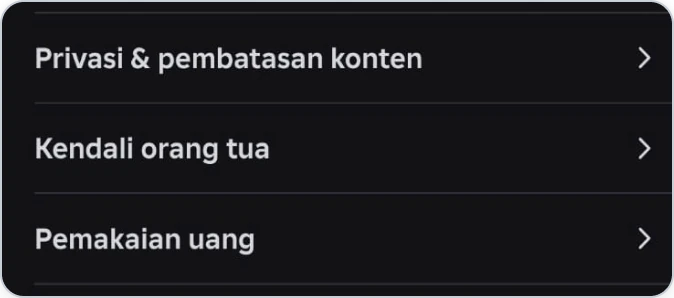
Roblox Settings menu with Parental Controls option

Parental Controls page with Add parent button

Parent email form with Send email button
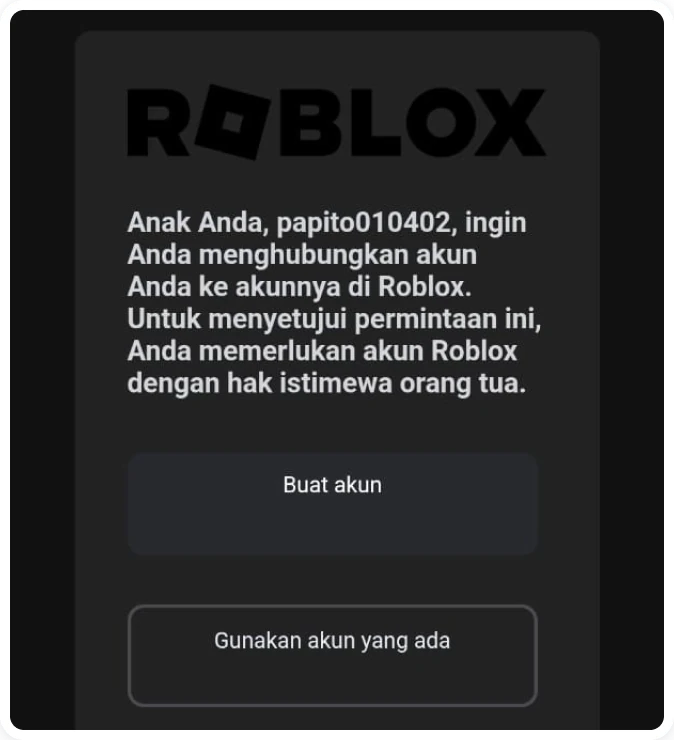
Email from Roblox for parents with Create account or Use existing account options
2. Tap Accept on the Robux page
Once the order status is Delivered, open the Robux page on your account. A message will appear stating that a user has sent Robux, then tap Accept.

Robux button in Roblox to open the Robux page

Incoming Robux transfer message with Accept button
3. Request parental permission
After tapping Accept, Roblox will ask for parental permission. Tap Request, then notify your parent.

Request parental permission message to receive Robux with Request button
4. Parent approves within 7 days
The parent opens the transfer request on their account and chooses to approve it. Do this within 7 days of the Robux being sent, as transfers older than 7 days will be cancelled. Roblox's guide on parent accounts is available on the Roblox Parental Controls page.
If a parent accidentally declines, the transfer cannot be resent. The Robux returns to Golrox and your order automatically becomes Golrox Koin, so your money isn't lost.
Robux via Username Not Arrived? Check This First
Most cases where Robux hasn't arrived have causes you can check yourself in a minute.
- Status is still Preparing or Pre-Order. Robux hasn't been sent yet. Pre-Orders follow the schedule shown at checkout.
- Transfer not accepted. Open the Robux page and look for the Accept button.
- Waiting for parental permission. Ask your parent to approve within 7 days.
- Account limit full. Some Robux arrives first, the rest is sent about 24 hours later. How to check the numbers is in the Robux limit check guide.
- Username typo. Status changes to Needs Correction. Fix the username on the Order Check page, and the order will be reprocessed automatically.
Still haven't received it after checking everything? Send your order ID to Golrox CS via Instagram @golroblox_. CS is active every day from 06:00 to 24:00.
Meaning of Robux via Username Order Status on Golrox
The status on the Order Check page helps you know the next step.
- Pre-Order: stock is out, order is sent according to the schedule at checkout.
- Preparing: payment received and Robux is being prepared.
- Resending: account limit full, Robux will be resent in about 24 hours.
- Needs Correction: order data needs fixing, e.g., username typo.
- Delivered: Robux has been sent. Child accounts still need parental approval.
- Delivered (yellow): only part of the Robux arrived due to limits, the rest became Golrox Koin.
- Refunded: order returned as Golrox Koin.
All Robux via Username orders on Golrox are protected by a 100% delivery guarantee, with a 4.9 rating from 6,900+ reviews. Never bought before? Start with how to top up Robux via username.
FAQ Receiving Robux via Username
Does Golrox provide a guaranteed delivery?
Yes. If Robux cannot be received by your account, for example due to a full limit or a declined transfer, the value is returned as Golrox Koin.
How long do parents have to approve a Robux transfer?
A maximum of 7 days from when the Robux is sent, as the transfer will be cancelled after that. If a transfer needs approval, the Golrox team will help with the process until the Robux is received, adjusting to the current queue.
Why did only some Robux arrive?
Usually because your account's daily or monthly limit is full. The rest is resent after the limit resets, and if it's still declined, the remainder becomes Golrox Koin.
What is Golrox Koin?
Koin is a balance in your Golrox account where 1 Koin equals Rp1. Koin enters the Golrox account that uses your order email and can be used for your next checkout.
Membantu?
Share This Article