How to Check Roblox Robux Limits 2026: Daily and Monthly
T
Tim Golrox
24 Nov 2026 • 03.21

How to check Robux limits on Roblox via Settings, in the daily and monthly Transfer limits section
The fastest way to check your Robux limit: open Settings in Roblox, select the Robux menu, then look at the Transfer limits section. It shows how much Robux your account can receive per day and per month via Robux Transfer.
This number is important before you receive Robux from friends or buy Robux via username. If the amount exceeds your remaining limit, the transfer will be rejected or will only arrive the next day.
What Is a Robux Transfer Limit?
Robux Transfer is a Roblox feature for sending Robux directly to other accounts. To keep things safe, Roblox limits how much Robux each account can receive in one day and within 30 days.
- Standard limit: 500 Robux per day and 1,000 Robux per month.
- High limit: up to 5,000 Robux per day and 10,000 Robux per month, for accounts with 2-Step Verification (2FA) enabled and a good account history.
The limit increase doesn't happen automatically. Roblox also considers account age and Robux purchase history before granting a higher limit.
How to Check Robux Limits on Roblox
These steps can be done on the app or browser. Make sure you are logged into the account that will receive the Robux.
- Open Settings, then select the Robux menu. In a browser, you can also open the Robux page in account settings.
- Look for the Transfer limits section.
- Note the Daily limit and Monthly limit numbers.
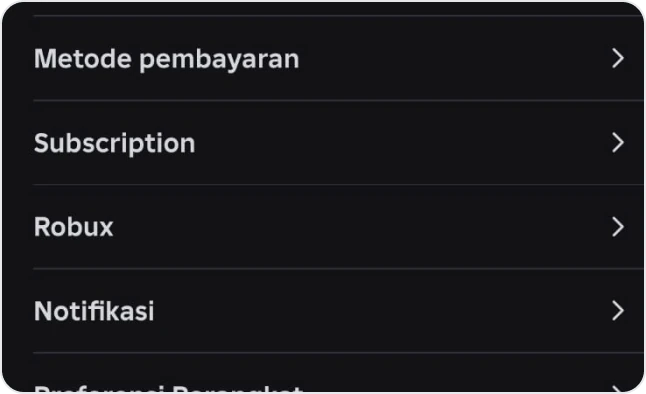
Roblox Settings menu to check Robux limits: select Robux

Roblox Transfer limits section containing daily and monthly limits
If the numbers are 500 and 1,000, your account is still on the standard limit. If the numbers are 5,000 and 10,000, your account has already received the high limit.
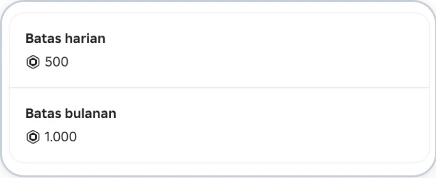
Example of standard Robux limit: 500 daily limit and 1,000 monthly limit

Example of high Robux limit: 5,000 daily limit and 10,000 monthly limit
How to Calculate Remaining Monthly Robux Limit
The monthly limit is not your remaining limit. You need to subtract the Robux you have already received in the last 30 days.
- On the same page, open Transaction history.
- Change the date period to Last 30 Days.
- Look at the Received Robux Transfer number.
- Calculate: remaining limit equals monthly limit minus Received Robux Transfer.

Transaction history link in the Robux Transactions section
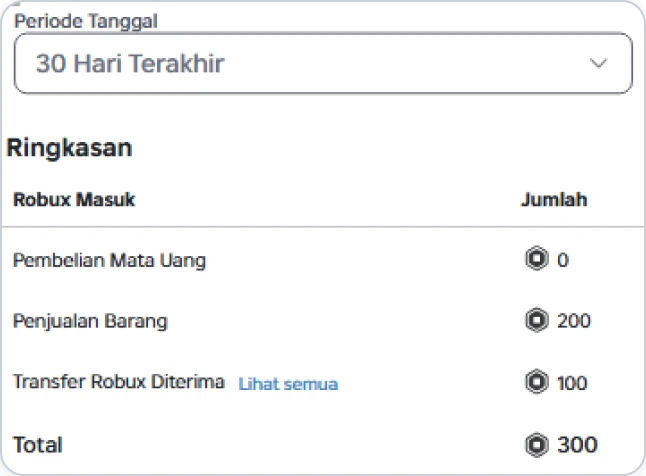
Last 30 Days summary with 100 Received Robux Transfer
For example, with a standard limit of 1,000 and you have already received 100 Robux, that means your remaining limit is 900 Robux. For a high limit of 10,000 with 100 Robux received, the remainder is 9,900 Robux.
When Do Robux Limits Reset?
The monthly limit does not reset on a specific date. Each Robux you receive is only counted as free again 30 days after the date it was received. So if you receive 1,000 Robux on September 1st, that 1,000 limit opens up again on October 1st.
The daily limit also applies separately. If the daily limit is full, the next transfer can only come in after the daily limit resets, about 24 hours later.
How to Get a Higher Robux Limit
The main step is to enable 2-Step Verification. In the Transfer limits section, accounts with a standard limit usually see a button to get a higher limit through this verification.
- Open Settings, then select Security.
- Scroll to the 2-Step Verification section.
- Select the Email method, then complete the verification.

Roblox 2-Step Verification settings with Email method for higher Robux limit
After 2FA is active, the limit doesn't always go up immediately. Accounts that are new or have never purchased Robux may remain at the standard limit for a while.
Robux Limits When Buying Robux via Username
This section is for those who want to top up Robux via username. Golrox cannot see your account's remaining limit before sending, so check the numbers first using the method above.
If your order exceeds the daily limit, the Robux is not lost. Golrox sends a portion first, then sends the rest about 24 hours later. If it is still rejected, the remainder automatically becomes Golrox Koin. The explanation of order status is in how to receive Robux via username.
Is your account limit still small? You can still buy via 5-Day Robux or Instant Login Robux. Neither uses Robux Transfer, so they are not affected by this limit.
If your limit is sufficient, continue on the Robux via Username page. Robux arrives in full without a password and without a Gamepass, with a 100% arrival guarantee.
Robux Limit FAQ
What is the daily Robux limit?
The standard limit is 500 Robux per day and 1,000 Robux per month. Accounts that get the high limit can receive up to 5,000 Robux per day and 10,000 Robux per month.
Why didn't the Robux limit go up even though 2FA is active?
Roblox also looks at account age and Robux purchase history. So 2FA is the main requirement, but it is not a guarantee that the limit will increase immediately.
Does Golrox provide a guarantee that it will be sent?
Yes. Robux via Username is protected by a 100% arrival guarantee. If Robux cannot be received because the limit is full, the remainder is returned as Golrox Koin.
If the limit is not enough, what happens to the Robux via username order?
Some Robux is sent first, and the rest is resent after the limit resets. The flow details are in the Golrox Help Center.
Membantu?
Share This Article