
Back

Username Robux
How long does Robux Instan Username take to arrive in my account?
How do I buy Robux via Instant Username?
I'm under 18, can I still buy?
Is Robux Instan Username guaranteed?
What are the daily and monthly Robux receive limits?
Roblox age verification: what is it, is it mandatory, and how do I do it?
What is Robux Instan Username?
How to link a parent account and approve Robux on Roblox
Why do I need to enable Roblox 2FA, and how do I do it?
What do the Robux Instan Username order statuses mean?
My account is Roblox Kids or Roblox Select, how do I receive Robux?
Why was my Robux Instant Username order refunded?
I made a typo in my username when buying Instant Username Robux, can I change it?
Daily and Monthly Robux Receive Limits, and How to Check Them
| Account status | Per day | Per month |
|---|---|---|
| Base limit | 500 Robux | 1,000 Robux |
| 2FA enabled and account in good standing | Up to 5,000 Robux | Up to 10,000 Robux |
Limit increases are not automatic. Roblox also considers account age and Robux purchase history.
When does the monthly limit reset? There is no fixed reset date. Every Robux you receive becomes available again as part of your limit 30 days after the date it was received. Example: if you receive 1,000 Robux on September 1st, that 1,000 Robux limit opens up again on October 1st.
Can I buy multiple times a day? Yes, as long as the total Robux received is still within your daily and monthly limits. Check your remaining limit before ordering again.
How to check your remaining limit:
- In Roblox, go to Settings then select the Robux menu.
- Check the Daily limit and Monthly limit under the Transfer limit section.
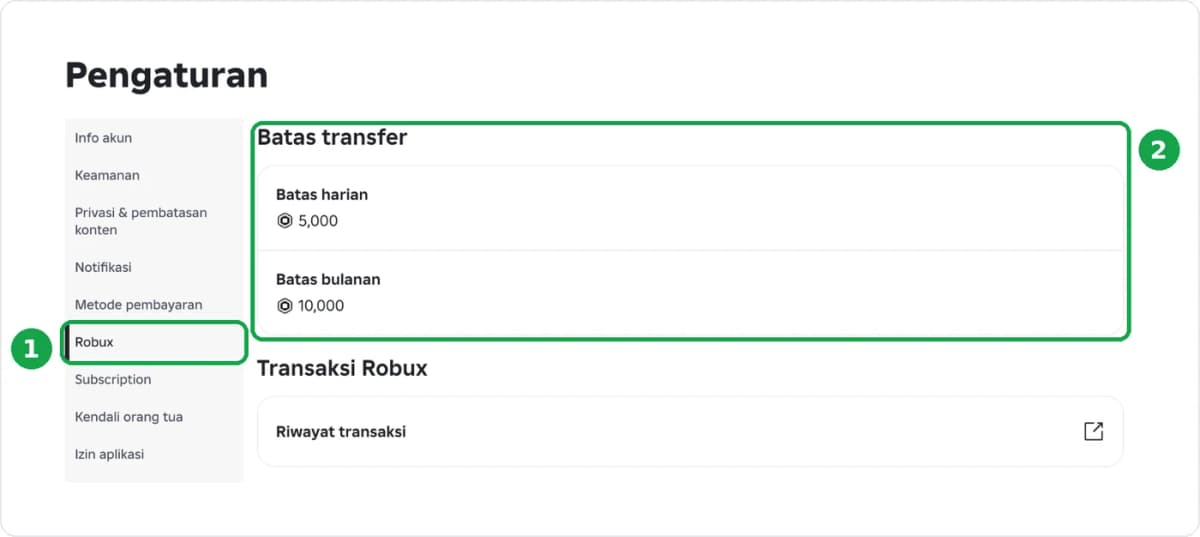
- Open My Transactions, change the Transaction Type to Robux Transfer to see the Robux you have received along with the dates.
- Subtract the Robux received in the last 30 days from your monthly limit. The result is your remaining limit.
Still confused? Send a screenshot of that page to CS via Instagram @golroblox_.
Was this helpful?

Need More Help?
Contact Our Customer Care
Ready to help from 06:00 - 24:00 every day!

© 2026 Golrox All Rights Reserved