
Back

Username Robux
How long does Robux Instan Username take to arrive in my account?
How do I buy Robux via Instant Username?
I'm under 18, can I still buy?
Is Robux Instan Username guaranteed?
What are the daily and monthly Robux receive limits?
Roblox age verification: what is it, is it mandatory, and how do I do it?
What is Robux Instan Username?
How to link a parent account and approve Robux on Roblox
Why do I need to enable Roblox 2FA, and how do I do it?
What do the Robux Instan Username order statuses mean?
My account is Roblox Kids or Roblox Select, how do I receive Robux?
Why was my Robux Instant Username order refunded?
I made a typo in my username when buying Instant Username Robux, can I change it?
Roblox Age Verification: What, Mandatory, and How
Age Check is an account age verification by Roblox, done via a face scan with your camera or an ID card. Golrox doesn't restrict buyer age, but Roblox has rules for receiving Robux Transfer:
- 16 years and older: just complete the age verification on your own account.
- Under 16 years old: the account must be linked to a parent's account, and the parent must approve every transfer. In some countries, parental consent is mandatory until age 18.
How to check and verify your age:
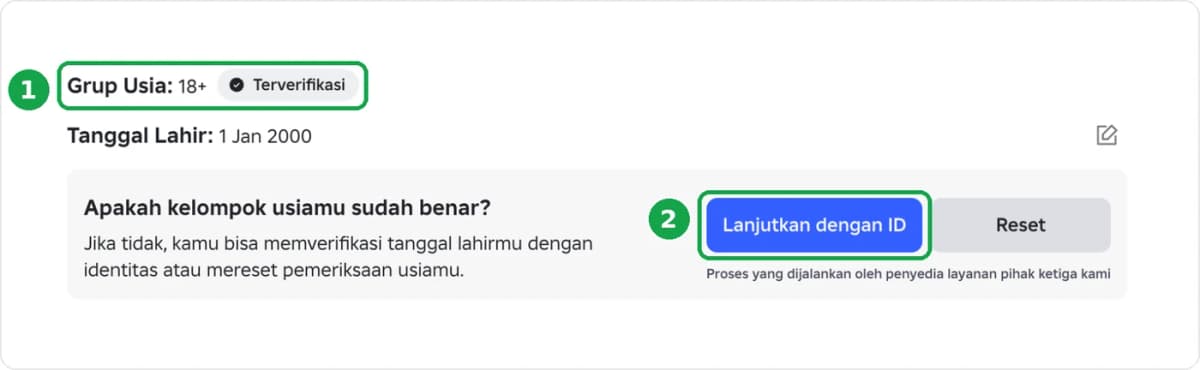
- In Roblox, go to Settings then Account Info.
- Look at Age Group. If it already says Verified, your account is good to go.
- If not, choose to verify with a camera or ID card (e.g., Continue with ID), then follow the instructions. It usually only takes a few minutes.
Was this helpful?

Need More Help?
Contact Our Customer Care
Ready to help from 06:00 - 24:00 every day!
© 2026 Golrox All Rights Reserved