
Back
Instant Login Robux
How long does Instant Login Robux take to arrive?
How to buy Robux via Instant Login on Golrox
Why does Robux Instan Login need a password? Is it safe?
Is Robux Instan Login guaranteed?
What is Robux Instan Login?
What do the Robux Instan Login order statuses mean?
What is a Roblox backup code and how do I get one?
Do I need to change my password after my Robux Instan Login arrives?
My Instant Login Robux order status is Problem, how do I fix it?
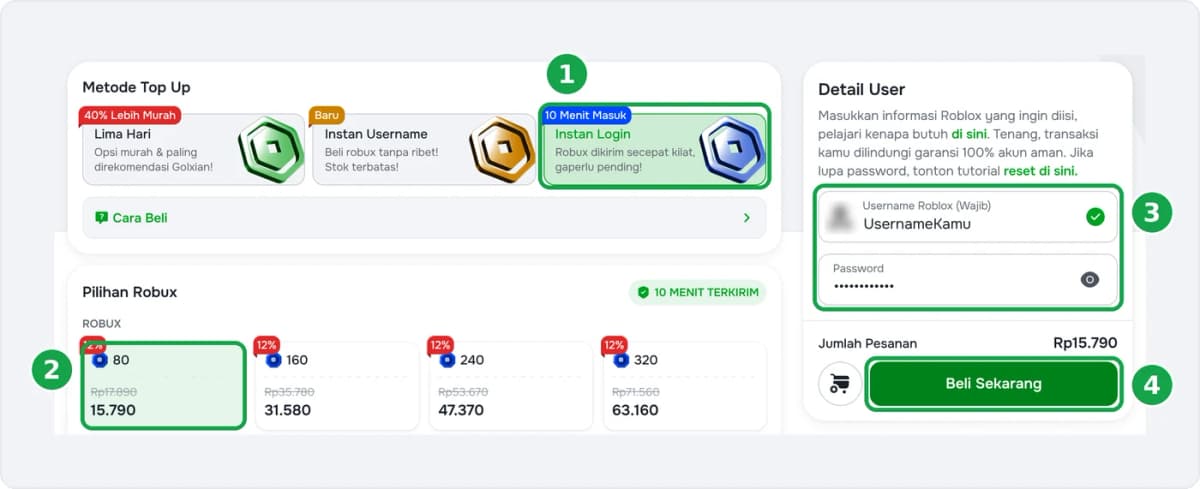
How to Buy Robux via Instant Login on Golrox
- Go to the Instant Login Robux page. Make sure the Instant Login method is selected.
- Choose the amount of Robux. The smallest package is 80 Robux.
- Enter your Roblox username and password in the User Details section.
- Click Buy Now, then complete the payment.
Robux usually arrives 10–15 minutes after payment, with no pending period. Track the status on the Check Order page. While the order is being processed, do not log in or play on the same account, and do not change your password.
Does your account use 2-step verification? Have your backup code ready so the order can be processed without waiting for a code from you.
Buying for a friend's account? It's more practical to use Instant Username Robux or 5-Day Robux, since you only need their username without a password.
Was this helpful?

Need More Help?
Contact Our Customer Care
Ready to help from 06:00 - 24:00 every day!
© 2026 Golrox All Rights Reserved