
Back
Gift Gamepass
How long does the Gift Gamepass process take and when is my slot?
Can a Drag Drive Simulator Gamepass be gifted 24/7?
How to join a private server for Gift Gamepass and fix "You do not have permission"
Is Gift Gamepass guaranteed?
Which games have gamepasses available on Golrox?
How do I request a game or gamepass that isn't available yet?
What is a Gamepass gift and where can I buy it?
What do the Gift Gamepass order statuses mean?
Typed the wrong username when buying a Gift Gamepass, what should I do?
Already joined the private server but Gift Gamepass hasn't been sent?
Bought the wrong Gift Gamepass or already have the Gamepass, can I exchange it?
Already Joined Private Server but Gift Gamepass Hasn't Been Sent?
Gift Gamepass is sent during the pickup schedule, which is when the Golrox team is in the private server. The schedule is shown on the Check Order page, for example "Ready for pickup until 23:59".
Golrox team hasn't arrived. As long as the status is Preparing, the team hasn't entered the server yet. Join when the status changes to Ready for Pickup and the Golrox Team is in the Server! sign appears, using the Pick Up Gamepass button or the Private Server link on the order page.
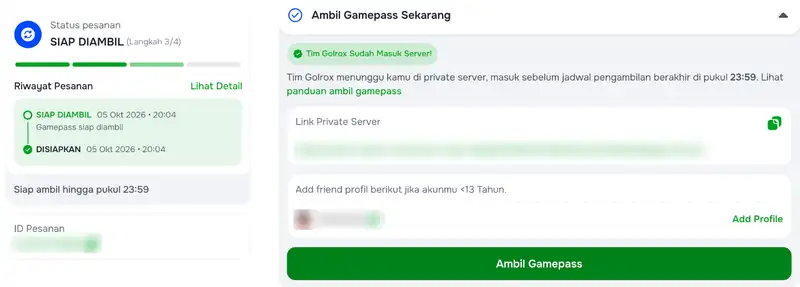
Already in the server, but the Gamepass hasn't been sent. Gamepass are sent in turns according to the queue, and the time cannot be estimated. Stay in the server until it's your turn.
Disconnected or left the server. The queue is not saved. Join again via the link on the order page, then queue again. Roblox usually kicks idle players after about 20 minutes, so move your character occasionally.
Server restarted or link won't open. Wait a few minutes, then open the latest link from the Check Order page again.
Status is already Sent. You don't need to join again. The Gamepass has been delivered, check your inventory or inside the game.
Pickup schedule ended before your turn. Your order is not void and will automatically move to the next schedule. If it keeps happening, contact CS via Instagram @golroblox_ with your order ID.
Accounts under 13 years old: add the Golrox profile as a friend listed on the order page before joining.
Was this helpful?

Need More Help?
Contact Our Customer Care
Ready to help from 06:00 - 24:00 every day!
© 2026 Golrox All Rights Reserved