Back
Orders & Payments
How to check your Golrox (Golroblox) order
Where can I get Golrox voucher codes and promo info?
Is buying Robux at Golrox safe and guaranteed?
How do I contact Golrox CS?
Can I get a refund after buying on the Golrox website?
Forgot your order ID or transaction not found?
Are Golroblox and Golrox the same?
What payment methods are available on Golrox?
Already paid but the status is still Unpaid?
Can I top up Robux using phone credit?
My order failed due to payment, why?
Are there any extra fees or deductions when buying Robux?
Why can't my Roblox username be found?
Can I change the Robux recipient account after paying?
Is there a way to get free Robux on Golrox?
What is Golrox Koin and how do I use it?
Why do Robux prices change or include VAT at checkout?
How to use a Golrox voucher code at checkout
How to Use a Golrox Voucher Code at Checkout
No need to log in to use a voucher.
- Select your product and amount, then click Buy Now.
- Enter your Roblox username and proceed to checkout.
- Click Use Promo & Voucher.
- Type the code in the Voucher Code field, click Use, then Save.
- Make sure the discount appears in the Payment Details before you pay.
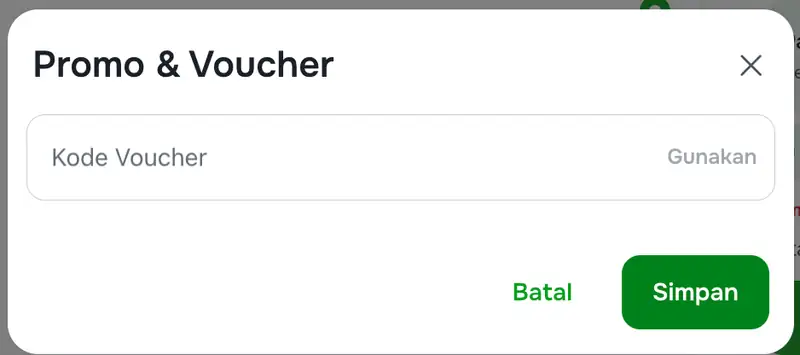
Code not working? Check the expiration date, minimum transaction, and applicable products. Vouchers cannot be exchanged for cash.
Voucher codes are shared on official Golrox channels. See: Where can I get voucher codes and Golrox promo info?
Was this helpful?
Need More Help?
Contact Our Customer Care
Ready to help from 06:00 - 24:00 every day!
© 2026 Golrox All Rights Reserved